
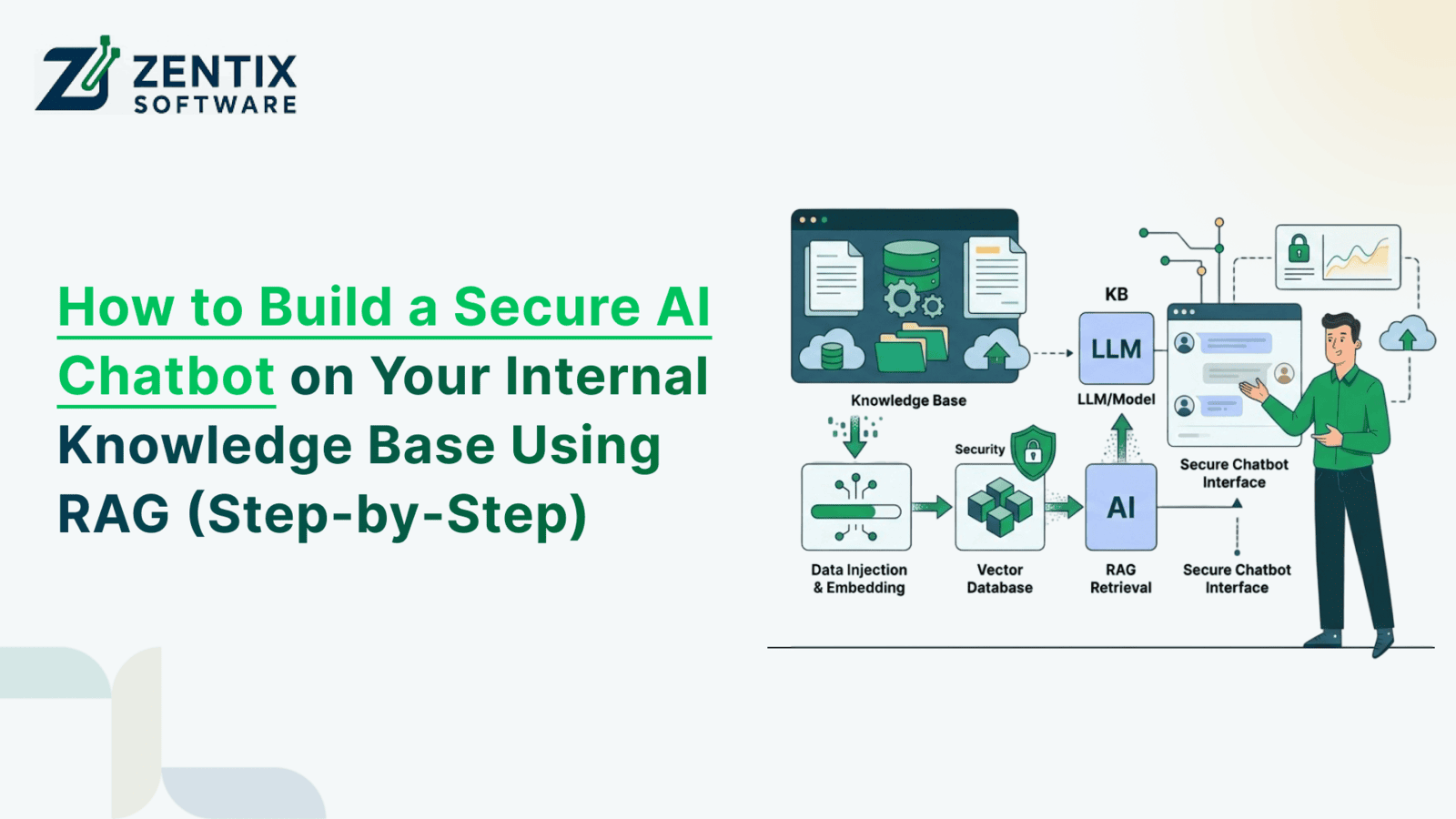
Over the last year, AI chatbots have gone from experimental tools to something businesses are actively trying to integrate into daily operations. Teams want faster access to information, quicker responses, and fewer repetitive tasks. But as companies start testing public AI tools, a bigger concern quickly appears: security.
Most businesses are not comfortable uploading internal documents, customer records, SOPs, financial information, or operational data into open AI platforms. The risk is simply too high.
That is why more organizations are now building private AI chatbots connected to their own internal knowledge bases. Instead of relying on generic internet-trained AI, businesses are creating systems that can securely retrieve company-specific information and provide more accurate responses to employees, support teams, sales departments, and operations staff.
This is where Retrieval-Augmented Generation (RAG) becomes extremely important.
RAG allows businesses to combine AI models with internal company knowledge without exposing sensitive data publicly. The result is a smarter, more reliable AI assistant that can answer questions using your organization’s own information.
At Zentix Software, we are seeing growing demand for secure AI systems that integrate directly with CRM platforms, Automate operational workflows, internal documentation, and support environments. Businesses are no longer looking for simple chat widgets. They want intelligent AI systems that actually improve productivity and decision-making.
What Is RAG (Retrieval-Augmented Generation)?
RAG may sound technical, but the idea behind it is actually very practical.
Traditional AI chatbots generate answers based on what they were trained on publicly. That means they often:
Give generic responses
Miss company-specific details
Provide outdated information
Sometimes create inaccurate answers entirely
RAG improves this process by allowing the AI system to retrieve information directly from your own internal data before generating a response.
Instead of guessing, the chatbot references actual company knowledge.
For example:
Employee policies
SOP documentation
CRM records
Internal FAQs
Knowledge base articles
Product documentation
Training materials
This makes responses far more relevant and reliable.
How Traditional AI Chatbots Work
Most public AI systems rely heavily on pre-trained information gathered from large internet datasets. While they can communicate naturally, they usually lack business-specific context.
This becomes a problem when employees ask operational questions like:
“What is our invoice approval process?”
“How do we escalate customer issues?”
“What are our onboarding requirements?”
“Where can I find the latest compliance guidelines?”
Generic AI tools often cannot answer these accurately because they do not have access to internal company knowledge.
How RAG Improves AI Responses
RAG changes the process completely.
Before generating an answer, the AI retrieves relevant information from your internal knowledge sources. The AI then uses that retrieved content to generate a response based on real company data.
This improves:
Accuracy
Context awareness
Operational usefulness
Response reliability
It also helps reduce hallucinations, which is one of the biggest concerns businesses have with AI systems.
Why Businesses Prefer RAG for Internal AI Systems
Businesses want AI systems they can actually trust.
A RAG-powered chatbot allows organizations to:
Keep sensitive data private
Maintain control over information access
Deliver company-specific answers
Improve employee productivity
Reduce repetitive support requests
This is becoming increasingly important for businesses implementing Zoho AI Chatbots development and internal AI automation systems.
Why Security Matters When Building AI Chatbots
Security should never be treated as an afterthought when building internal AI systems.
Many businesses make the mistake of focusing only on chatbot functionality without considering how sensitive company information will be protected.
That creates serious risks.
Data Leakage Risks
Businesses often store highly sensitive information inside internal systems:
Customer data
Financial records
Contracts
HR documents
Internal procedures
Operational workflows
If AI systems are not configured properly, businesses risk exposing confidential information unintentionally.
This is one reason companies increasingly prefer working with a certified Zoho partner and trusted Zoho AI Service Provider instead of relying on generic chatbot tools.
Role-Based Access Matters
Not every employee should have access to every piece of information.
A secure AI chatbot should include:
Department-based permissions
User authentication
Role-level access controls
Restricted document visibility
For example:
HR teams may access employee policies
Finance teams may access invoice workflows
Sales teams may access CRM information
This type of controlled access becomes critical in larger organizations.
Secure API and System Integrations
AI chatbots often connect with:
ERP systems
HR platforms
Internal dashboards
Helpdesk software
Poorly configured integrations can create vulnerabilities.
A properly designed architecture ensures secure communication between systems while maintaining compliance and operational control.
What Businesses Can Actually Use Internal AI Chatbots For
Many businesses still think AI chatbots are mainly for customer support websites. In reality, internal AI systems are becoming much more valuable behind the scenes.
HR Knowledge Assistance
HR departments spend a huge amount of time answering repetitive questions.
Employees regularly ask:
Leave policy questions
Onboarding process details
Payroll timelines
Benefits information
Internal procedure requests
A secure AI chatbot can instantly retrieve this information without HR teams manually responding every time.
CRM and Sales Support
Sales teams often waste time searching for information across systems.
An AI assistant connected to Zoho CRM can help teams:
Retrieve customer details
Access sales documentation
Review deal status
Find proposal templates
Track customer interactions
This improves response speed and operational efficiency.
Internal IT and SOP Support
IT and operations teams frequently manage repetitive internal requests.
Employees often need:
Troubleshooting instructions
SOP guidance
Access process information
Technical documentation
Instead of manually searching through files or messaging support teams, employees can ask the AI assistant directly.
Finance and Operations Assistance
Finance teams handle structured processes that often create delays.
AI chatbots can help employees:
Understand approval workflows
Access invoice procedures
Review payment guidelines
Retrieve reporting instructions
This reduces internal dependency on manual communication.
Step-by-Step: How to Build a Secure AI Chatbot Using RAG
Building an effective AI chatbot is not just about connecting an AI model. Businesses need a structured implementation strategy.
Step 1: Define the Business Problem Clearly
One of the biggest AI implementation mistakes is building a chatbot without a specific operational goal.
Start by identifying:
Which departments need support
What repetitive tasks exist
Which workflows create delays
What information do employees search for most often
The most successful AI projects solve very specific operational problems first.
Step 2: Organize Your Internal Knowledge Base
AI quality depends heavily on data quality.
Businesses should organize:
SOPs
PDFs
Documentation
CRM knowledge
Helpdesk content
Internal FAQs
Outdated or poorly structured data will create poor AI responses.
This step is often underestimated but becomes one of the most important parts of the project.
Step 3: Choose the Right AI Infrastructure
Not every business needs the same setup.
Some organizations may prefer:
Cloud-hosted AI systems
Private AI environments
Hybrid deployments
Secure enterprise hosting
The right architecture depends on:
Security requirements
Operational scale
Integration needs
Compliance concerns
Step 4: Implement Retrieval-Augmented Generation (RAG)
This is where the actual intelligence layer gets built.
The system:
Stores business knowledge in searchable formats
Retrieves relevant information based on user queries
Sends context to the AI model
Generates accurate responses using retrieved data
While the technical side involves embeddings and vector databases, businesses mainly care about one thing: getting reliable answers from internal information securely.
Step 5: Build Proper Access Controls
Security must be built directly into the chatbot architecture.
Businesses should implement:
User authentication
Department-level permissions
Access restrictions
Secure document handling
This prevents unauthorized access to sensitive information.
Step 6: Integrate the Chatbot With Existing Business Systems
The most useful AI systems connect directly with operational tools.
That often includes:
Zoho CRM
HR platforms
ERP systems
Ticketing systems
Internal dashboards
Reporting tools
This is where Bespoke Zoho Development becomes important because businesses often require customized integrations and workflows.
Step 7: Test, Refine, and Optimize Continuously
AI systems improve over time.
Businesses should continuously:
Monitor response quality
Review user behavior
Improve retrieval accuracy
Update documentation
Refine workflows
A chatbot should evolve alongside the business itself.
Common Mistakes Businesses Make When Building AI Chatbots
Many businesses rush AI implementation without proper planning.
Some of the most common issues include:
Using unorganized internal data
Ignoring security planning
Overcomplicating chatbot workflows
Building without real business use cases
Failing to manage permissions properly
Not maintaining the knowledge base
AI systems require long-term optimization, not one-time deployment.
The Role of Zoho AI Agents in Business Automation
AI agents go beyond traditional chatbots.
Instead of simply answering questions, AI agents can:
Trigger workflows
Route tickets
Update CRM records
Automate operational tasks
Coordinate business processes
For example:
A support AI agent can escalate unresolved tickets automatically
A CRM AI assistant can retrieve customer history instantly
An HR AI agent can guide onboarding workflows
This creates a much more intelligent operational environment.
Why Businesses Need a Certified Zoho Partner for AI Chatbot Development
Building secure business AI systems requires more than chatbot setup.
Businesses need:
Workflow expertise
Integration strategy
Security planning
Scalable architecture
Long-term optimization support
A certified Zoho partner understands how to connect AI systems directly into existing business operations without disrupting workflows.
At Zentix Software, our focus is on building AI systems that fit real operational environments rather than creating isolated chatbot tools.
How Zentix Software Helps Businesses Build Secure AI Chatbots
At Zentix Software, we help businesses design AI systems that are secure, scalable, and operationally useful.
Our services include:
AI chatbot strategy and planning
Secure RAG implementation
Zoho CRM integration
AI workflow automation
Custom AI agent development
Role-based AI access systems
Internal knowledge base integration
Long-term optimization support
As a Zoho AI Service Provider and certified Zoho partner, we focus heavily on practical implementation that improves business efficiency instead of adding unnecessary complexity.
The Future of AI Chatbots Is Internal, Intelligent, and Workflow-Driven
AI chatbots are evolving quickly.
Businesses no longer want simple website bots that answer generic questions. They want intelligent AI systems that support employees, automate workflows, and improve operational efficiency across departments.
The future is moving toward:
AI copilots for teams
Workflow-driven AI agents
Internal operational assistants
Real-time knowledge retrieval
AI-assisted decision support
Organizations that build secure AI infrastructure early will likely gain a major operational advantage over time.
Conclusion
Businesses are quickly realizing that public AI tools are insufficient for operational workflows involving sensitive internal information.
Secure AI chatbots powered by Retrieval-Augmented Generation allow businesses to combine the flexibility of AI with the reliability of internal company knowledge.
When implemented properly, these systems improve productivity, reduce repetitive work, streamline information access, and support faster decision-making across departments.