
Zoho AI Document Processing Solutions
Automate Documents with Zoho. Extract Data. Streamline Workflows.
Intelligent Document Processing Built on Zoho
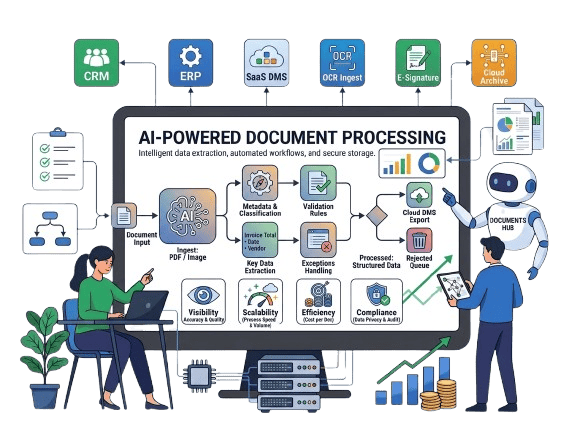
Managing documents manually across systems slows down operations and increases errors. With Zoho-based AI Document Processing, you can automate data extraction, connect workflows, and centralize document handling. By combining Zoho Creator, OCR capabilities, and Zoho Flow, we enable seamless processing from document intake to final action.

Zoho Creator-Based Solutions

OCR-Powered Data Extraction

Secure Document Management

Zoho Ecosystem Integration

Workflow Automation with Zoho

Scalable Document Processing
What We Offer: End-to-End Zoho Document Processing Services
Zoho Workflow Assessment & Planning
We analyze your document processes and design automation workflows.
- Document lifecycle mapping
- Zoho app selection (Creator, Books, CRM, Flow)
- Automation strategy planning
Zoho Workflow Automation & Integration
We automate document handling across your Zoho ecosystem.
- Zoho Flow automation setup
- Routing documents to CRM, Books, or custom apps
- Approval workflows and notifications
OCR Integration & Data Extraction Setup
We implement intelligent extraction using OCR within Zoho workflows.
- Invoice and document data capture
- Integration with OCR APIs
- Field mapping and structured data output
Validation, Monitoring & Optimization
We ensure accuracy and continuous improvement.
- Data validation rules in Zoho Creator
- Error handling and audit logs
- Ongoing optimization and support

The Challenge: Manual Document Processing in Zoho Environments
Even with Zoho applications, document handling often involves manual steps that slow down operations and introduce errors.
- Manual Data Entry: Teams manually input data into Zoho systems, consuming time and effort.
- High Error Rates: Repetitive entry increases inconsistencies across Zoho apps.
- Slow Processing: Delays in capturing and routing documents impact workflows.
- Unstructured Documents: PDFs and scanned files are difficult to process without automation.
- Compliance Challenges: Lack of standardized processes leads to audit and tracking issues.
The Solution: Zoho AI-Powered Intelligent Document Automation
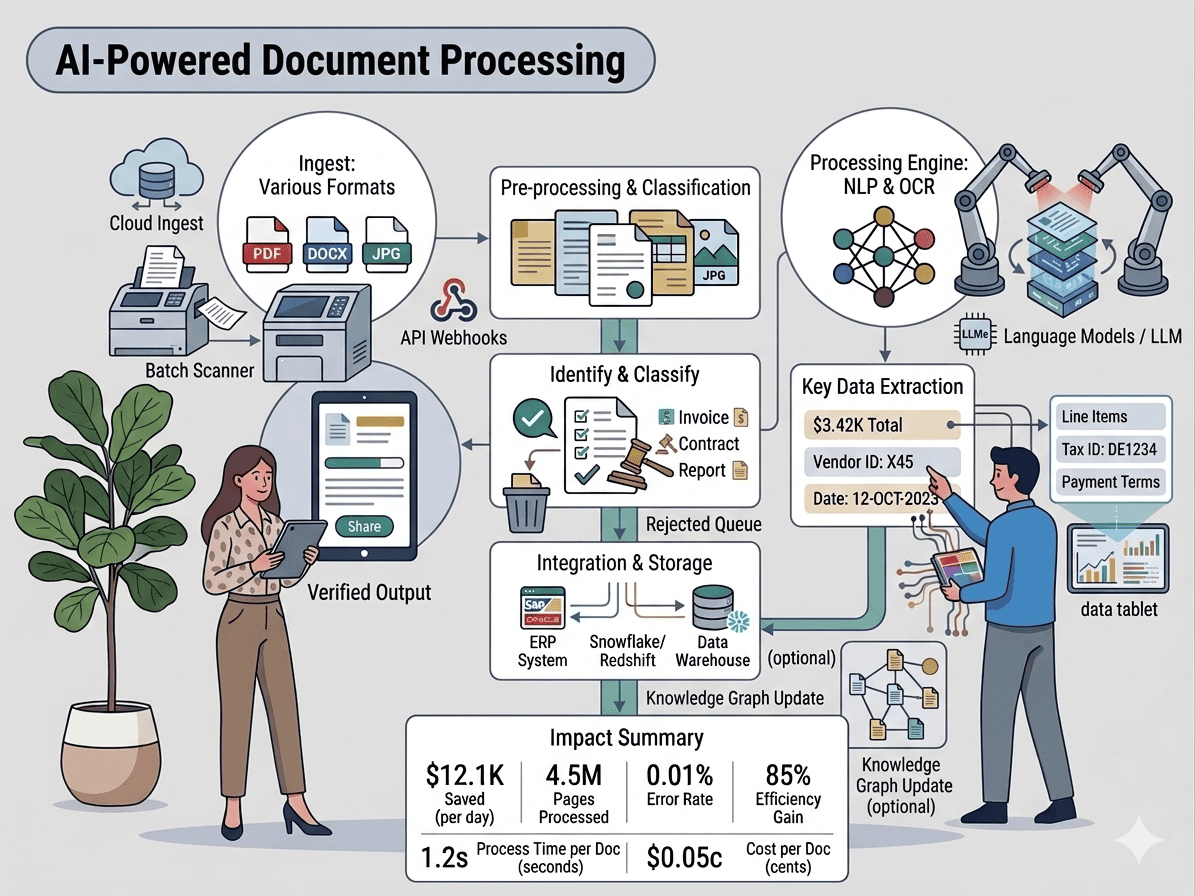
By combining Zoho Creator, OCR, and Zoho Flow, businesses can fully automate document processing with accuracy and efficiency.
- Automated Data Extraction: Capture key data from invoices and documents using OCR.
- Smart Classification: Categorize documents within Zoho Creator based on type and content.
- Data Validation & Cleaning: Apply rules to ensure accuracy before storing in Zoho systems.
- Automated Routing: Use Zoho Flow to send documents to the right teams or applications.
- Audit & Compliance Tracking: Maintain logs and structured records within Zoho for governance.
Key Use Cases for Zoho AI Document Processing

Invoice Data Extraction with Zoho Books
Automatically extract invoice details and push them into Zoho Books for accounting.

Contract Processing in Zoho Creator
Store, classify, and track contracts with extracted key terms and dates.

KYC & Onboarding Automation
Process identity documents and store structured data in Zoho CRM or Creator.

Purchase Order Matching
Match invoices with purchase orders and inventory data using Zoho Inventory.

Claims Processing Workflows
Automate claims data extraction and route cases through Zoho workflows.
CASE STUDIES
Our Case Studies
 |  |
Digitally Transforming Custom Manufacturing Operations with Low-Code
| |
Achieving Operational and Financial Harmony with Xero & Zoho
Integration
Growing businesses often find themselves using specialized tools for different functions, Zoho for sales, operations, and customer engagement, and Xero for accounting and financial management. While both platforms are powerful individually, the lack of integration between them leads to duplicate data entry, delayed financial insights, and misalignment between teams. Integrating Zoho and Xero bridges this gap—creating a unified, real-time workflow between operations and finance.
| |
Transforming Nonprofit Data Management with Low-Code Technology
A nonprofit organization dedicated to supporting underserved communities, particularly those relying on sign language, was facing major challenges with data tracking, reporting, and program management. Their mission to provide accessible services and education was being held back by inflexible tools and manual processes.